KCoNestSupport Center
Find answers, learn how to install the app, troubleshoot issues, and get the most out of KCoNest.
How Can We Help You?
Choose a topic to get started
Install App
Install KCoNest on iPhone, Android, or Desktop
Getting Started
Set up your account and invite your co-parent
Messaging
Send secure messages and share files
Calendar & Events
Manage shared schedules and appointments
Expenses
Track and split shared costs
Account Settings
Manage your profile and preferences
Security & Privacy
Protect your account and data
Troubleshooting
Fix common issues and errors
Install KCoNest on Any Device
KCoNest is a Progressive Web App (PWA) that works on all devices. Install it for the best experience with offline access and push notifications.
Install on iPhone
iOS 13.0 or later
Open Safari Browser
KCoNest must be installed using Safari on iPhone. Open Safari and visit kconest.com
💡 Note: Chrome and other browsers do not support PWA installation on iOS
Tap the Share Button
Tap the Share icon at the bottom of Safari (square with arrow pointing up)

Step 2: Tap the Share Button
Add to Home Screen
Scroll down and tap "Add to Home Screen"
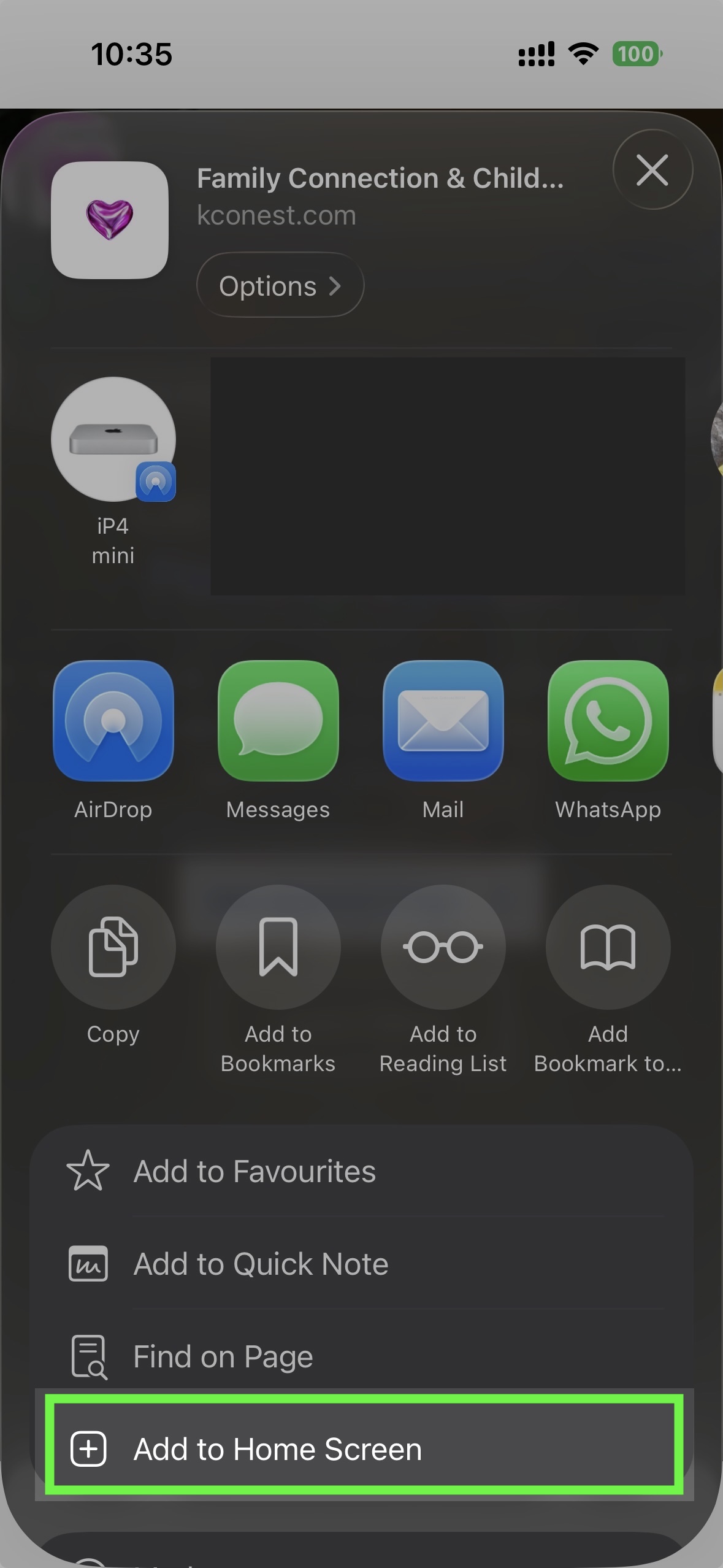
Step 3: Add to Home Screen
Confirm Installation
Tap "Add" in the top right corner. The KCoNest icon will appear on your home screen
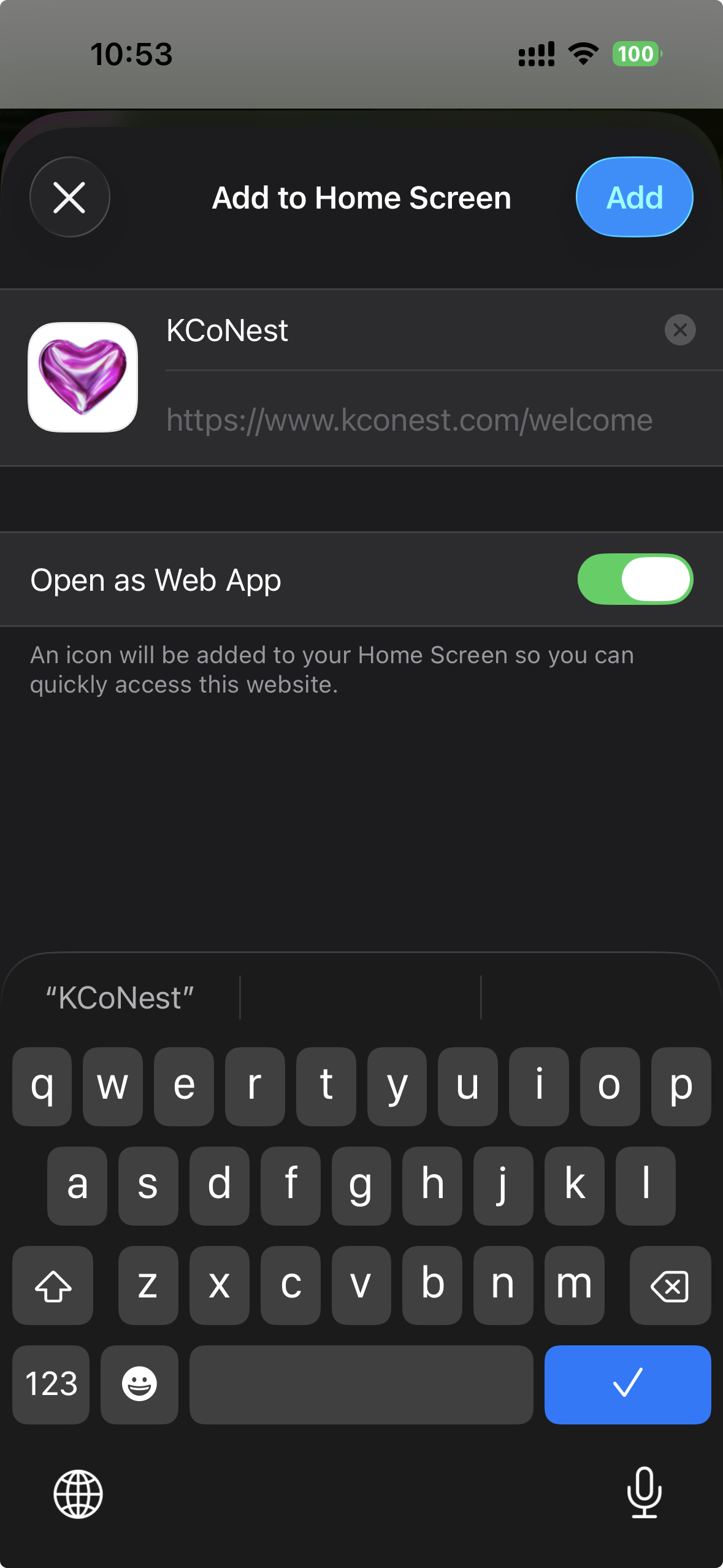
Step 4: Confirm Installation
Launch KCoNest
Tap the KCoNest icon to open the app. It will open in full-screen mode without browser controls
💡 Pro Tip: You can now use KCoNest offline and receive push notifications!
Don't want to install?
You can always use KCoNest directly in your web browser at kconest.com. However, installing gives you:
- Offline access to your data
- Push notifications for important updates
- Faster loading times
- No browser controls (cleaner interface)
- Easy access from home screen/app drawer
New to KCoNest?
Follow these guides to get up and running in minutes
Create Your Account
Invite Your Co-Parent
Add Your Children
Learn How to Use Each Feature
Detailed guides for all KCoNest features
Manage Your Account
Guides for account settings and preferences
Profile Settings
Notifications
Password & Security
Privacy Settings
Family Settings
Fix Common Issues
Quick solutions to frequently encountered problems
Connection Issues
Login & Access
Notifications
Sync & Data
App Installation
Other Issues
Your Data is Protected
Learn how we keep your information safe and private
Account Security
Data Encryption
Privacy Controls
Data Management
Access & Permissions
Our Security Commitment
KCoNest is 100% Free
No credit card required. No hidden fees. No premium tiers. Free forever for all co-parents.
Why is KCoNest Free?
- Built by a co-parent who understands the financial challenges
- Sustained through optional community donations
- Grants from family welfare organizations
- Belief that co-parenting tools should be accessible to everyone
Want to Support KCoNest?
While KCoNest is free to use, donations help us:
- Keep the platform running and maintained
- Add new features and improvements
- Provide better support
- Help more families co-parent peacefully
Common Questions
Will KCoNest always be free?
Yes! We're committed to keeping KCoNest 100% free forever. No features will ever be locked behind paywalls.
Do I need a credit card to sign up?
No credit card needed—ever. Just your email to create an account.
Are there any hidden fees?
None whatsoever. All features are completely free with no limits or restrictions.
What if I can't afford to donate?
That's perfectly fine! KCoNest is free for everyone. Donations are completely optional and never required.
Learn by Watching
Step-by-step video guides for every feature
Getting Started with KCoNest
Complete walkthrough of creating your account, inviting your co-parent, and adding children
Installing KCoNest on iPhone
Step-by-step guide to installing KCoNest as a PWA on iOS devices
Installing KCoNest on Android
How to install KCoNest on Android phones and tablets
Using the Shared Calendar
Learn how to create events, set reminders, and manage your shared schedule
Expense Tracking Made Easy
Log expenses, upload receipts, and track shared costs with your co-parent
Secure Messaging Tips
Best practices for clear, accountable communication through KCoNest
Document Storage & Organization
Upload, organize, and access important documents from anywhere
Understanding Happiness Pulse
Track your children's emotional wellbeing with daily check-ins
Search Our Help Articles
Over 100 articles covering every aspect of KCoNest
Popular Articles
How to reset your password
Installing KCoNest on iPhone
Understanding message read receipts
How to log shared expenses
Adding events to shared calendar
Uploading and organizing documents
Enabling push notifications
Inviting family members
Get in Touch with Support
Can't find what you're looking for? Our team is here to help!
Response Time
Average response time: Under 1 hour
24/7 email support available
What to Include
- •Detailed description of the issue
- •Screenshots if applicable
- •Device/browser information
- •Steps to reproduce the problem
Send us a Message
Before Contacting Support
You might find your answer faster in our knowledge base or troubleshooting guide